Every regulated customer asks the same question: “Where does my data go?”
For years, the answer was complicated. CDN providers process traffic at the nearest edge — great for performance, but it means a visitor’s request might get decrypted in London, Singapore, or São Paulo. That’s a problem when your customer’s HIPAA BAA says patient data stays in the US, or their GDPR compliance team requires EU-only processing.
Cloudflare’s Data Localization Suite gives you a concrete answer. I enabled it on saltwaterbrc.com in 30 seconds. Here’s exactly what happened.
The Setup: One Dropdown
Regional Services is configured per-hostname on the DNS Records page. No API calls required, no configuration files, no engineering tickets.
Dashboard → DNS → Records → Edit the proxied record → Region dropdown.
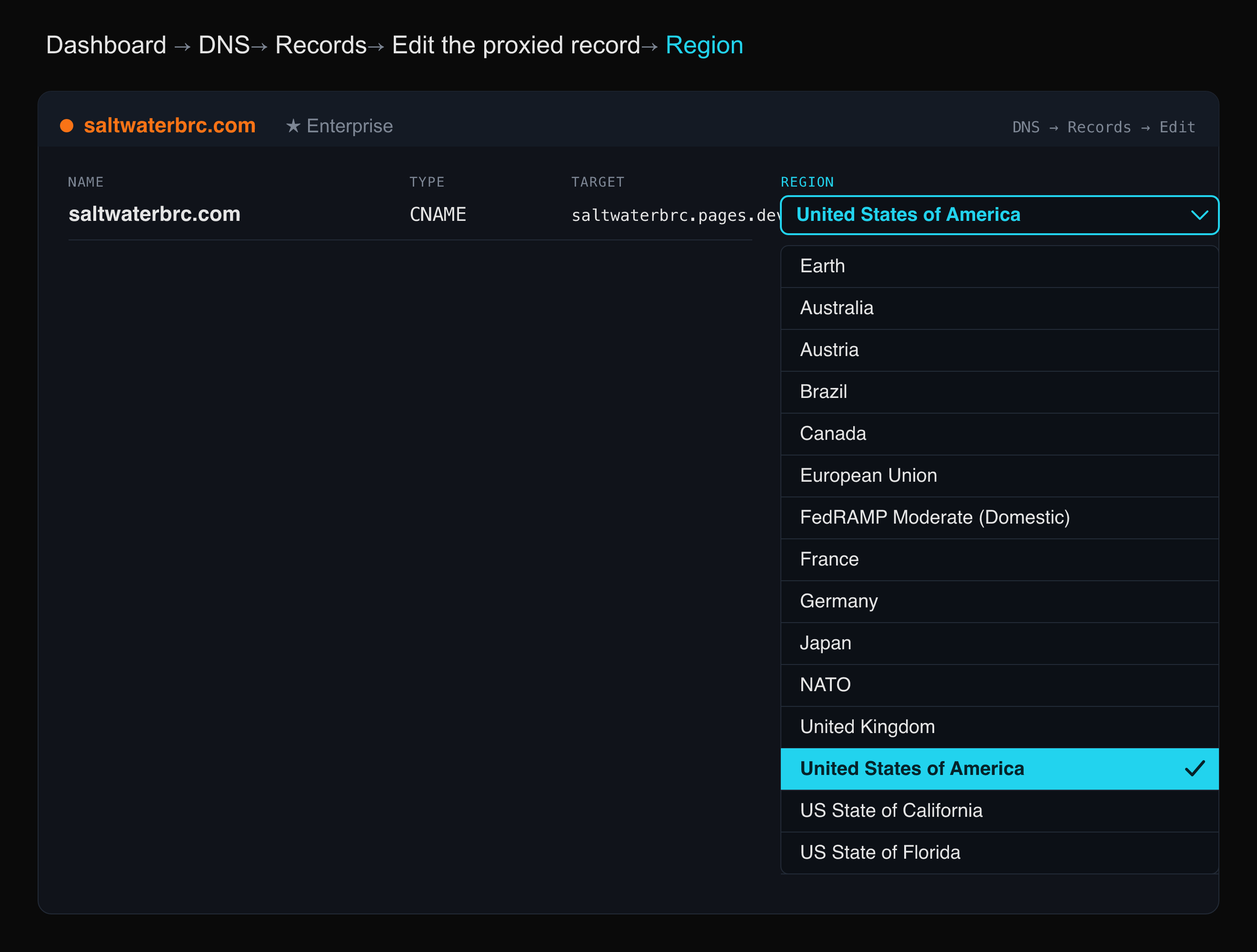
That dropdown includes over 30 region options — from individual countries (US, Germany, Japan, Brazil) to compliance-specific zones (FedRAMP Moderate Domestic, ISO 27001 EU, NATO, Schengen Area) to US state-level options (California, Florida, Texas).
I selected United States of America, clicked Save, and it was live.
Proving It: The Trace
Every Cloudflare-proxied site has a built-in diagnostic endpoint at /cdn-cgi/trace. It returns the 3-letter IATA code of the data center that processed your request.
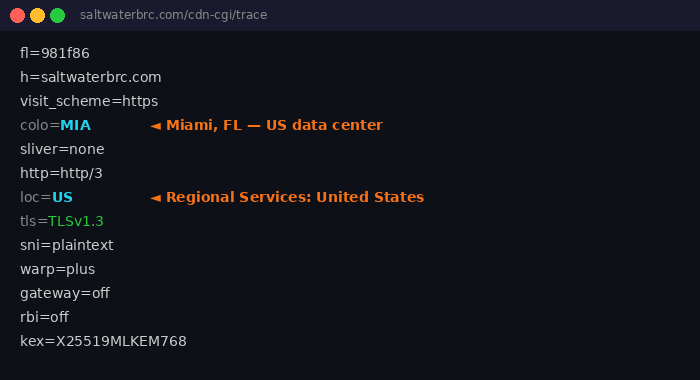
colo=MIA — Miami. My traffic was decrypted and processed at Cloudflare’s Miami data center. Not Singapore. Not Frankfurt. Miami, Florida, United States.
This isn’t a setting you have to trust — it’s a setting you can verify. On every single request.
I built a live demo page on this site that fetches the trace endpoint in real time and maps the data center code to a city. Pull it up on your phone right now — you’ll see which US data center handled your request.
How It Actually Works
Here’s the important nuance: Regional Services doesn’t sacrifice global performance for regional compliance. It splits the work.
Layer 3/4 (DDoS protection) stays global. Volumetric attacks get absorbed at the nearest data center worldwide. Cloudflare doesn’t need to read your HTTP data to drop a SYN flood — it works on packet headers alone.
Layer 7 (everything else) moves in-region. TLS decryption, WAF inspection, bot detection, Workers execution, caching — anything that requires reading the actual HTTP request — only happens inside the configured region.
Traffic arrives globally but gets opened regionally.
The Three Layers
Regional Services is one piece of the full Data Localization Suite. Together, the three layers answer every data residency question a customer can ask:
| Layer | What It Controls | Customer Question |
|---|---|---|
| Regional Services | Where traffic is decrypted and processed | ”Where does Cloudflare see my data?” |
| Customer Metadata Boundary | Where logs and analytics are stored | ”Where do you store data about my traffic?” |
| Geo Key Manager | Where TLS private keys are held | ”Where are my encryption keys?” |
Regional Services is per-hostname (DNS record level). Customer Metadata Boundary is account-level. Geo Key Manager is per-certificate. Three settings across three pages — full data sovereignty.
Who Needs This?
Every industry with data residency requirements. Here are the conversations I’m having:
Healthcare (HIPAA) — A hospital’s patient portal has PHI in HTTP requests — patient names, dates of birth, medical record numbers in URLs and POST bodies. Their HIPAA BAA requires US-only processing. Regional Services set to US guarantees that TLS decryption only happens in US data centers. The hospital keeps global DDoS protection without the compliance risk.
Financial Services (PCI / SOC 2) — Banks with contractual obligations that customer financial data won’t be processed outside the US. Even WAF inspection counts as “processing” under most contracts. Regional Services gives them an API-verifiable answer: “Our traffic is only decrypted in the US. Here’s the trace proving it.”
EU Companies (GDPR) — Post-Schrems II, EU companies must guarantee that PII isn’t decrypted outside the EU. Regional Services set to EU (or Germany, France, or ISO 27001 EU specifically) gives them verifiable proof of EU-only processing.
US Government (FedRAMP) — Federal agencies requiring FedRAMP Moderate compliance. The FedRAMP Moderate Compliant (Domestic) region restricts processing to FedRAMP-certified US data centers only — not just any US data center, but specifically the subset with FedRAMP certification.
The Demo
I built a live demo at saltwaterbrc.com/data-localization that does three things:
-
Probes the trace endpoint and shows you exactly which data center processed your request — data center code, city name, country, and a region verification badge.
-
Shows the raw trace so you can see every field Cloudflare returns — TLS version, HTTP protocol, key exchange algorithm, WARP status.
-
Explains the three DLS layers with the customer questions each one answers, plus use cases by industry.
Pull it up in a customer meeting. Let them see it with their own eyes.
What This Means for Sellers
Data localization isn’t a niche compliance checkbox anymore. It’s a standard enterprise requirement. Every RFP in healthcare, finance, government, and EU markets includes some version of “where does our data go?”
The old answer was a 40-page whitepaper. The new answer is a dropdown and a verifiable trace endpoint.
If you’re a Cloudflare seller reading this: learn the three layers, know the region options, and keep the /cdn-cgi/trace trick in your back pocket. It’s the fastest proof point in any data residency conversation.
Regional Services is live on saltwaterbrc.com, processing all traffic in the United States. Try the live demo or check the trace yourself at saltwaterbrc.com/cdn-cgi/trace.